
Popular topics

Popular topics

WEEX Affiliate Portal | Campaigns user guide
By: WEEX
|
0
Manage multiple referral strategies in one place: WEEX Affiliate Portal Campaigns guide
Use the "Campaigns" feature in the WEEX Affiliate Portal to create and manage referral codes and links for different promotional channels. Set spot and futures cashback ratios and campaign dates to manage multiple referral strategies and track their performance in one place.
At a glance
- Go to "Campaigns" to view existing referral strategies, referral codes, links, and corresponding cashback ratios.
- Search by referral code or date range, and export the results.
- Create separate strategies for different promotional channels or events, each with its own referral code and link.
- Set a start date and choose whether the strategy remains active permanently or ends on a specific date.
- Configure spot and futures cashback ratios separately, and review your final commission rate and the cashback ratios for your direct invitees.
- Once you've saved a strategy, copy its referral link and share it with potential users.
The "Campaigns" feature helps you manage referral strategies for different channels, events, and partners. Whether you're creating referral codes for different channels, such as Telegram and YouTube, managing KOL partnerships, or setting custom cashback ratios for limited-time events, you can do it all in one place.
1. View and search referral strategies
The "Campaign performance" page displays your existing referral strategies, making it easy to review the settings for each referral code.
Log in to the WEEX Affiliate Portal and click "Campaigns" in the left sidebar to view the following details:
Field | Description |
Campaign name | Identifies different referral strategies. |
Referral code | Unique referral code for the strategy. |
Referral link | Sign-up link generated from the referral code. You can copy and share it directly. |
Spot cashback ratio | Shows the spot commission rate for you and the cashback ratio for your direct invitees under the strategy. |
Futures cashback ratio | Shows the futures commission rate for you and the cashback ratio for your direct invitees under the strategy. |
To find a specific strategy, enter a referral code or select a date range, then click "Search." Click "Export" to download the results.
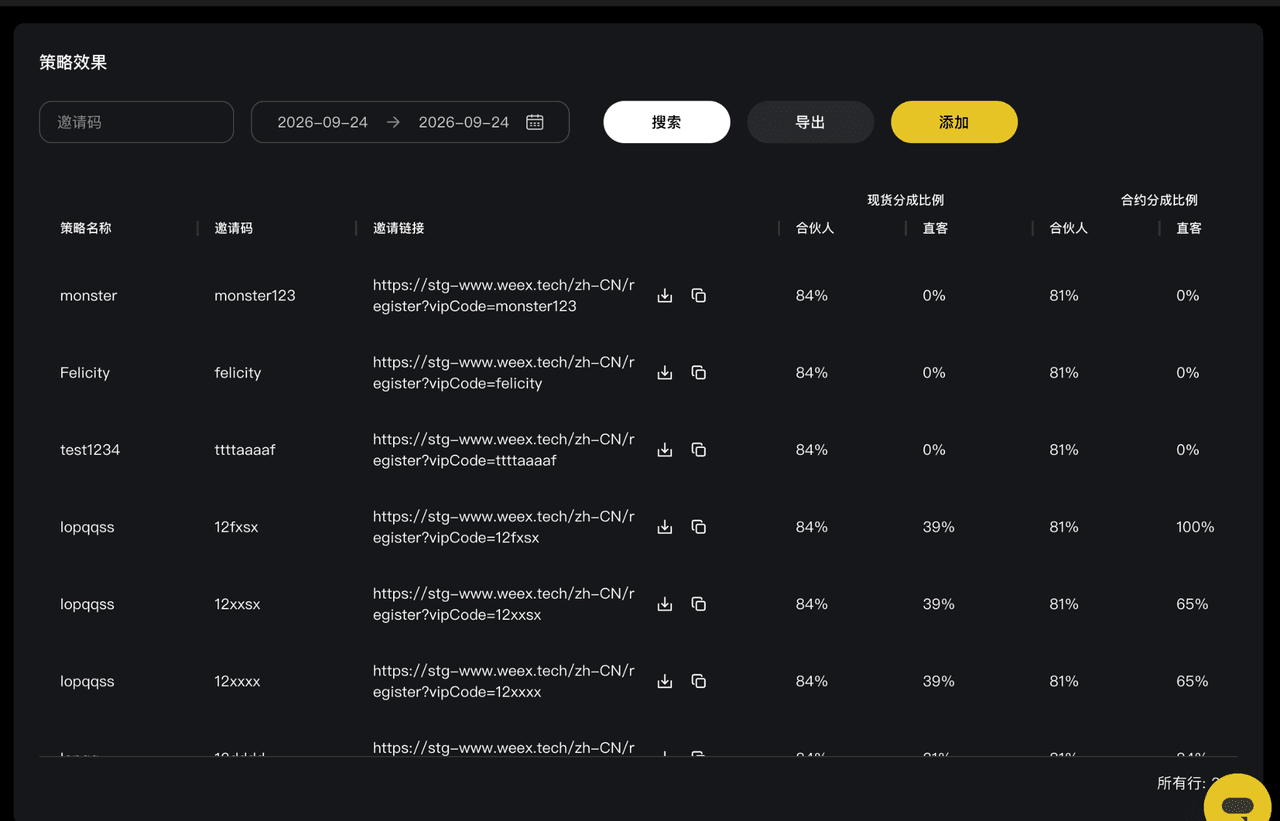
Campaign performance: View referral codes, links, and cashback ratios, and search for specific strategies.
2. Create a new referral strategy
If you need a separate referral strategy for a new promotional channel, partner, or event, use the "Add" feature to set one up.
2.1 Set up basic information
Click "Add" in the upper-right corner to open the "New campaign" page.
Field | Requirements | Tips |
Campaign name | Up to 10 characters. | Use a short, recognizable name, such as Telegram, YouTube, or KOL-A. |
Referral code | 6 – 11 characters, using lowercase letters and numbers only. | Choose a code that reflects the channel or event for easier tracking. |
Effective period | Set a custom start time and choose an end option. | • Permanent: Best for ongoing promotions through communities and social media channels. • Specific date: Best for limited-time events, short-term promotions, or KOL partnerships. |
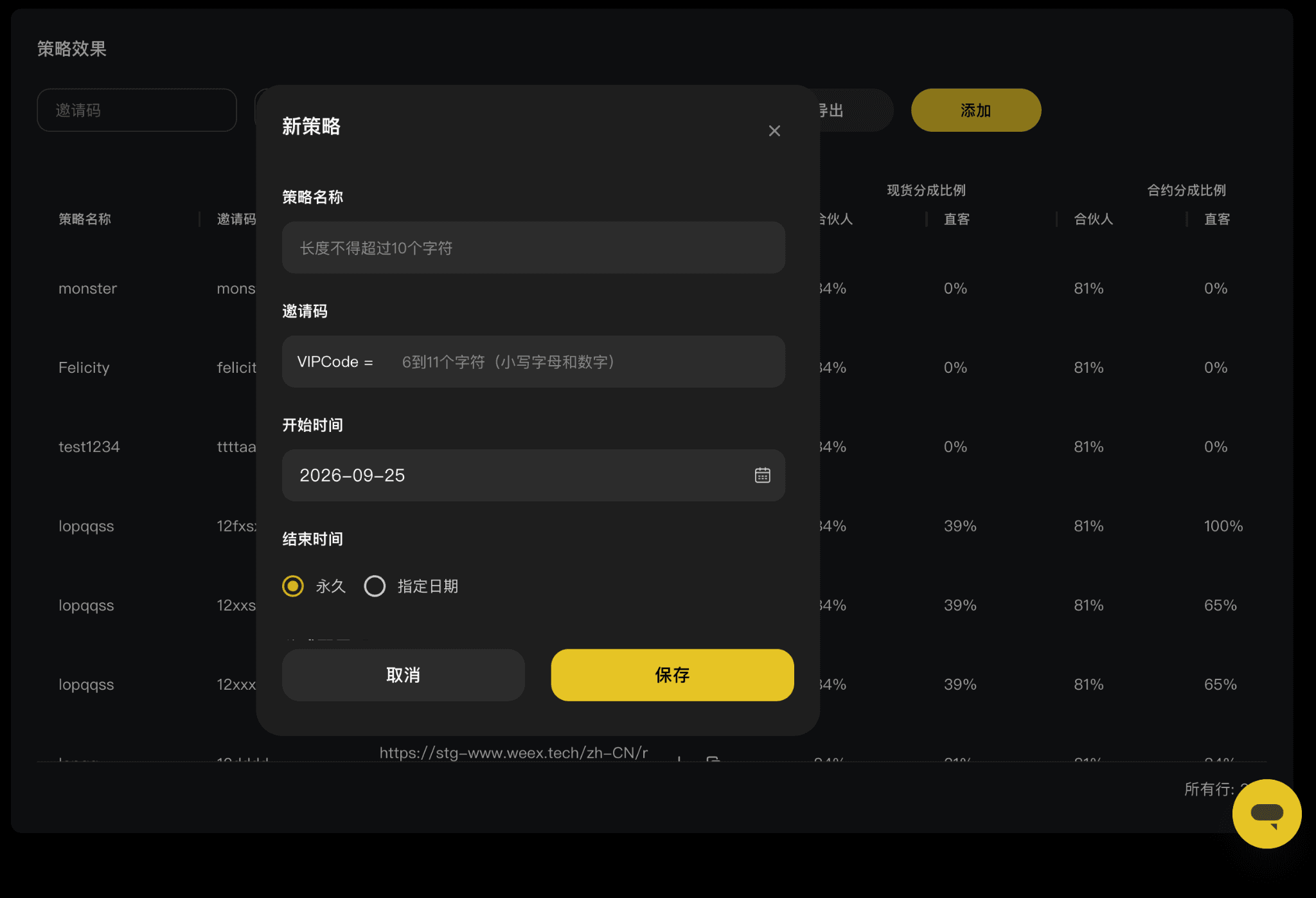
Basic settings for a new campaign
2.2 Set spot and futures cashback ratios
After entering the basic information, configure spot and futures cashback ratios separately to match your promotional strategy.
Spot cashback settings
The page displays the available spot commission rate, "My final commission rate," and "Direct invitee's final cashback ratio."
You can adjust the spot cashback ratio for your direct invitees within the allowed range and review the final rates for both parties.
Futures cashback settings
You can configure futures cashback ratios separately. The page also shows the available commission rate, your final commission rate, and the final cashback ratio for your direct invitees, so you can review the settings for each trading type.
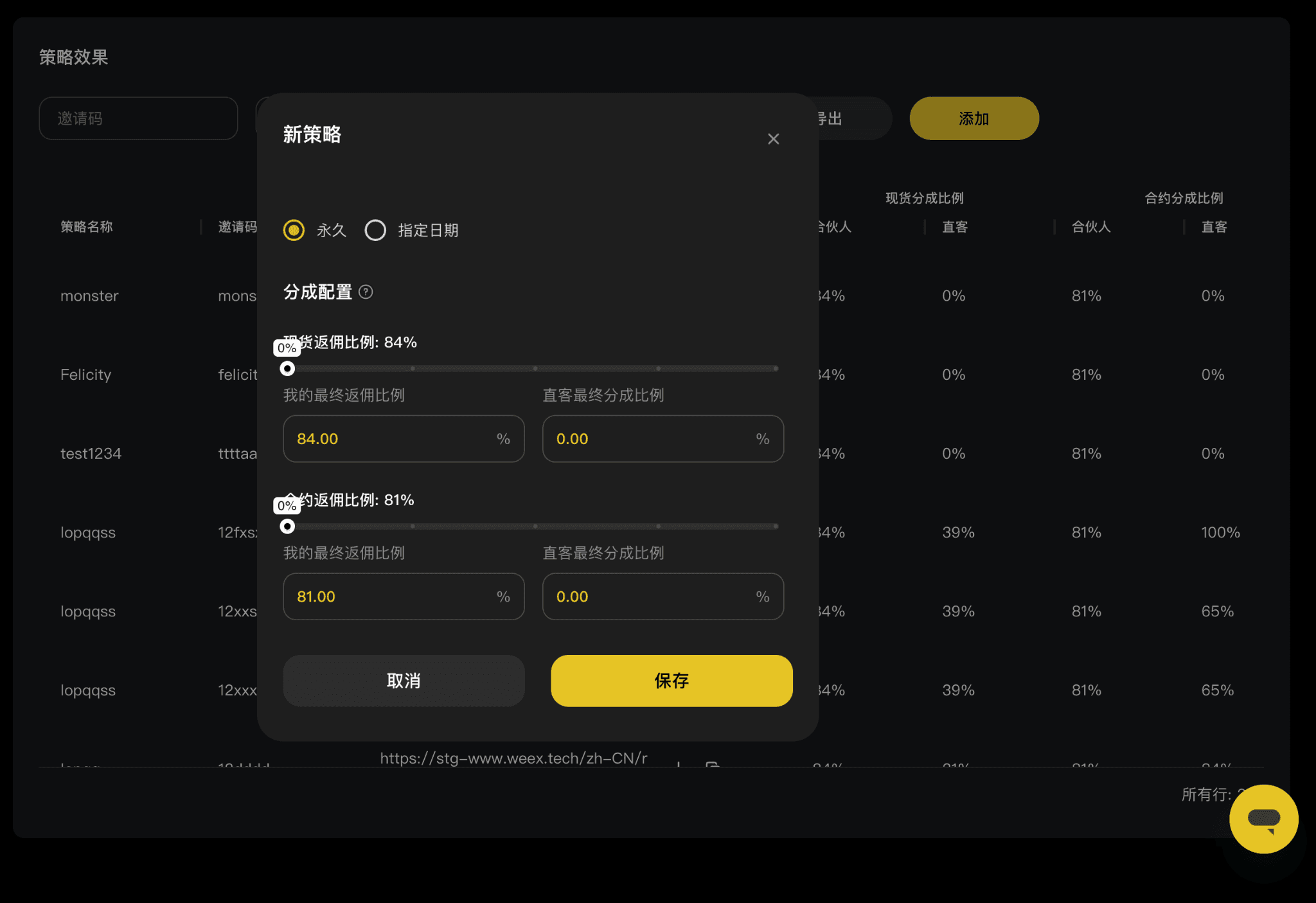
Spot and futures cashback settings
Note: Available rate ranges may differ between spot and futures. Check the limits shown on the page and review both sets of rates before saving.
2.3 Save your strategy and get the referral link
- Review the campaign name, referral code, effective period, and spot and futures cashback ratios.
- Click "Save" to create the strategy.
- Once saved, return to the "Campaigns" list, find your new strategy, and copy its referral link to use in your promotions.
Using separate referral codes for different campaigns makes it easier to manage your links and cashback arrangements without mixing up settings across channels or events.
3. Recommended workflows
Goal | Recommended action |
Use separate referral codes for different channels | Create a strategy for each channel, such as Telegram, YouTube, or online communities, to track referral sources. |
Manage multiple KOL partnerships | Assign each partner a unique referral code and corresponding cashback ratios. |
Run limited-time promotions | Create an event-specific strategy with a start time, end date, and cashback ratios. |
Manage ongoing promotional channels | Select "Permanent" to keep the strategy active without repeatedly creating new ones. |
Find existing strategies | Search by referral code or date range to review strategy details and cashback settings. |
Save campaign data | Click "Export" to download the current search results. |
Important reminders
The "Campaigns" feature in the WEEX Affiliate Portal lets you manage referral codes, links, and spot and futures cashback settings across multiple promotional channels in one place.
We recommend creating separate strategies for different channels, partners, or events rather than reusing the same referral code across multiple promotions. Choose "Permanent" for ongoing campaigns or set a specific end date for limited-time promotions.
Before creating a strategy, double-check the referral code, effective period, and cashback ratios. Available rate ranges, rules governing when strategies take effect, and actual commission and cashback amounts are subject to WEEX's official rules and the data displayed in the Affiliate Portal. Make sure your promotional activities comply with applicable local laws and regulations and WEEX affiliate program rules.
About WEEX
Founded in 2018, WEEX is a leading global cryptocurrency exchange serving over 10 million users across more than 170 countries and regions. Focused on security, liquidity, and ease of use, WEEX offers over 1,500 spot trading pairs and up to 400× leverage on crypto futures. Beyond spot and derivatives trading, WEEX is expanding into AI-powered trading with real-time AI insights and trading tools, while exploring innovations such as Trade to Earn. WEEX also maintains a 1,000 BTC Protection Fund to enhance asset security and transparency. Features such as copy trading and advanced trading tools enable users to follow experienced traders and trade more efficiently.
Follow WEEX on social media
Instagram: @weex_exchange
TikTok: @weex_Official
YouTube: @WEEX_Official
LinkedIn: WEEX Global
Telegram: WEEX English Official
Related articles
Share
Gainers


Customer Support:@weikecs
Business Cooperation:@weikecs
Quant Trading & MM:bd@weex.com
VIP Program:support@weex.com
