


How to Change Email and Phone Number on WEEX: Steps and Recovery
To change WEEX email phone number settings, a user logs in, opens the profile menu, chooses Security and finds the Email and Phone options on the Security settings page.
Changing these details involves finding the right menu entry, completing security verification and, when access to an email or phone number is lost, submitting a recovery request.
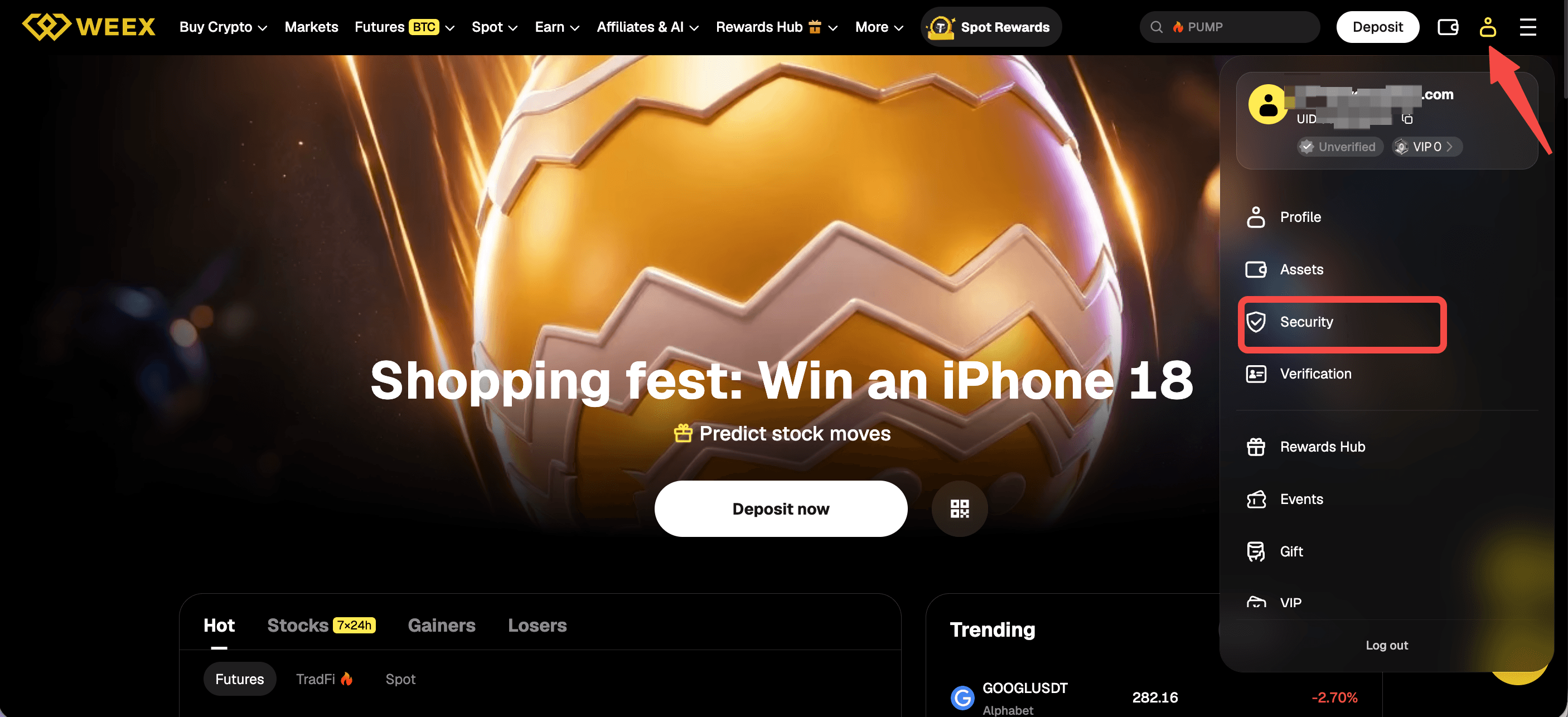
Where are the email and phone number settings on WEEX?
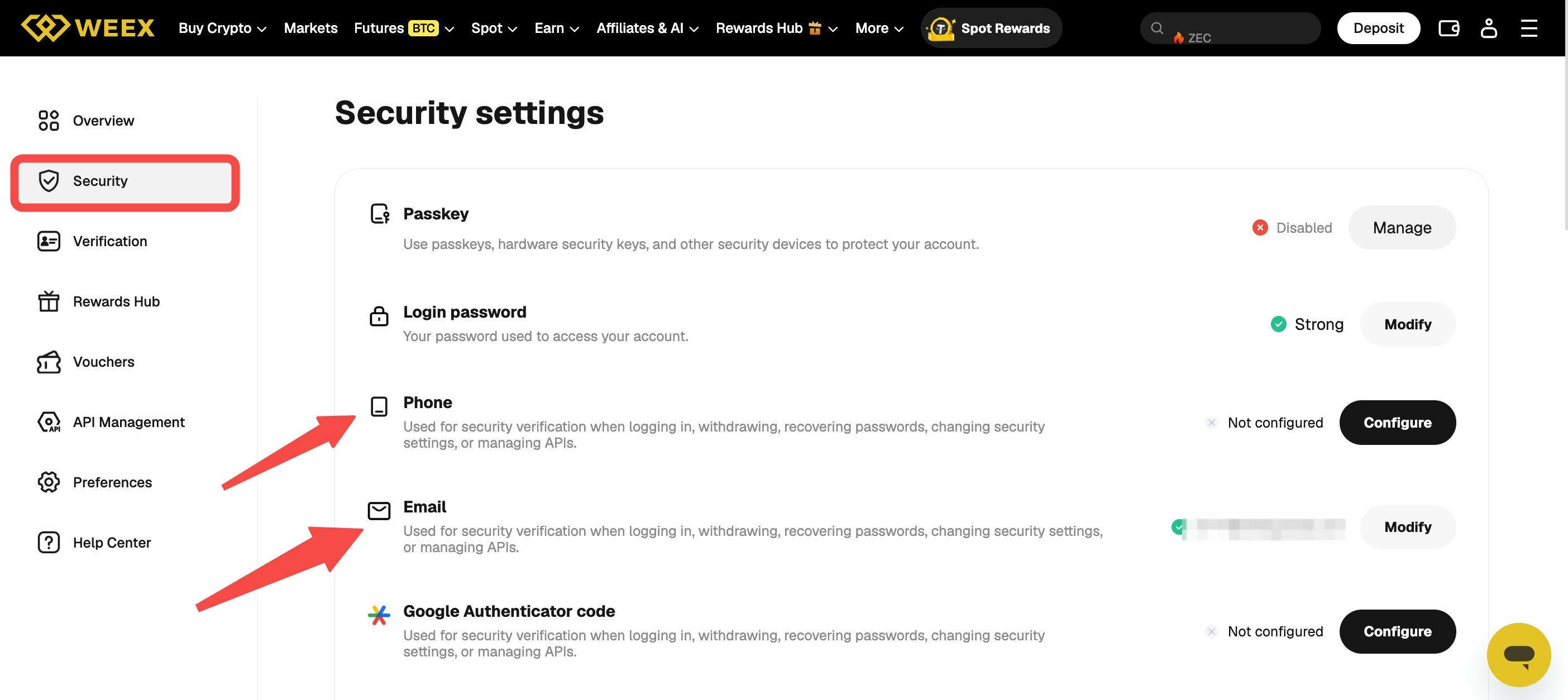
The email and phone number settings are on the Security settings page, reached from the profile icon in the top-right corner of the WEEX header. After logging in, the user clicks the profile icon and chooses Security in the dropdown. The page lists Passkey, Login password, Phone, Email and Google Authenticator code. The left menu also offers Overview, Verification, Rewards Hub, Vouchers, API Management, Preferences and Help Center.
Each row carries a short description. For both Phone and Email, the page states that the item is used for security verification when logging in, withdrawing, recovering passwords, changing security settings or managing APIs. For that reason, these two details are part of how WEEX verifies actions on an account, not only a way to receive notifications.
How to change the email on WEEX
A user opens Security settings, finds the Email row and clicks Modify. According to WEEX’s profile guide, a new email address may need to be verified, and WEEX may send a verification code to the email or phone to confirm the change. The user then enters the code to finish.
The steps shown on screen after clicking Modify are the ones to follow, since the order of verification can depend on which security methods an account has enabled. The email is also used for account recovery, which makes it important to use an address the account holder controls and can access at any time.
How to add or change the phone number on WEEX
On Security settings, the Phone row is the entry point for phone number settings, and it shows Configure when no phone number has been set up. In the screenshot of the page, the Phone row reads “Not configured” with a Configure button, and the description states that the phone is used for security verification when logging in, withdrawing, recovering passwords, changing security settings or managing APIs. Clicking the button starts the setup, and a verification code may be sent to the email or phone to finish the change.
Phone numbers carry an extra risk. WEEX’s account security guide recommends Google Authenticator over SMS because SMS verification is exposed to SIM swap attacks, so users may consider whether a phone number should be the only additional layer on an account.
What verification to expect when changing email or phone number
WEEX may send a verification code to the email or phone to finalize the change, and a new email may need its own verification. The number of codes and the order in which they are requested are shown on screen during the change, so users should keep access to their current email and phone until the change is complete.
WEEX’s account security guide adds two safeguards. The first is to enable the Anti-Phishing Code in account settings, so genuine WEEX emails can be recognised. The second is to access WEEX through a bookmarked link rather than through links in messages, since requests to confirm account changes are a common phishing target. A message asking for confirmation of an email or phone change that the user did not start should not be opened, and Security settings should be reviewed directly on the official website instead.
What to do if access to the email or phone is lost
Users who can no longer use a security verification method can submit a request on the recovery page. The flow has four steps: select the unavailable security options, submit data, wait while the request is under review, and receive the completed reset. WEEX states that support reviews requests within 24 hours and resets the selected method.
When two or more methods are selected, the page states that customer service contacts the user for video verification, which may take longer than 24 hours. The recovery page does not name email, phone or Google Authenticator individually, so users should follow the prompts shown on screen.
Does changing the email or phone number affect withdrawals?
Email and phone are used for security verification when withdrawing, according to the descriptions on the Security settings page.
Users who plan to withdraw funds soon after changing either detail should read the confirmation screens shown during the change and contact WEEX support for any limits that apply to their account before moving funds.
Conclusion
To change email and phone number on WEEX, users go to Security settings from the profile icon and use the Email or the Phone . A verification code may be sent to the email or phone to complete the change, and a new email may need to be verified. Users who have lost access to a verification method can request a reset on the recovery page, where support reviews requests within 24 hours and video verification applies when two or more methods are affected. Questions about limits after a change, such as withdrawals, should go to WEEX support.
FAQ
1. How to change the email on WEEX?
A user opens Security settings from the profile icon, finds the Email row and clicks Modify. A verification code may be sent to the email or phone to finish the change, and a new email may need verification.
2. How to change or add a phone number on WEEX?
On Security settings, the Phone row shows Configure when no number is set up. Users follow the on-screen prompts, and a verification code may be sent to the email or phone to complete the change.
3. What verification is needed to change email and phone number on WEEX?
WEEX may send a verification code to the email or phone, and a new email may need to be verified. The steps are shown on screen after clicking Modify or Configure.
4. What happens if access to the email or phone is lost on WEEX?
Users can submit a request on the security verification recovery page, which lists four steps and states that support reviews requests within 24 hours. Selecting two or more unavailable methods can lead to video verification, which may take longer.
5. Does changing the email or phone number on WEEX affect withdrawals?
The Security settings page states that email and phone are used for security verification when withdrawing. Users who need to know whether limits apply after a change should contact WEEX support before moving funds.

Gainers


